In developmentPilots are being planned

Accelerate your Dynamics 365 Supply Chain Management and Finance implementation with an AI-native approach

Your D365 specialists know the application and your business flows. That insight is the input, and it is the validation. Accelio drafts in between, and agents set up Dynamics 365 through Microsoft's own MCP server.

Your D365 specialists give the input and validate the result. Accelio drafts in between.

Apply for a pilot

Playing. Click a step to stop on it.

Illustration with demo values. The agent and migration steps are in development.

Click through the product

Accelio is an AI-native platform built for one thing: Dynamics 365 Supply Chain Management and Finance. It generates the deliverables that used to be manual and resource intensive. Your people review, decide and own the result.

Accelio generates the deliverables that used to be manual. Your people review, decide and own the result.

The product design, running live with demo data. Click the menu inside it to look around. Swipe sideways to see the rest.

Three problems Accelio solves

  1. You pay expensive D365 specialists to produce documentation by hand

    Around half of an implementation is producing documents by hand: requirements, fit-gap, designs, test cases, configuration and migration mappings. By our estimate, Accelio's drafts get you about halfway. Your D365 specialists can then focus on what only they can do: bring D365 insight, review, and decide the direction of the solution.

    Accelio drafts the requirements, designs, test cases and mappings. Your specialists review and decide.

  2. When D365 specialists leave the project, the knowledge leaves your organisation

    Decisions sit in people's heads, workshop notes and scattered files. A requirement changes, and the design, the test and the setting behind it do not follow. Worse, when people leave the project, what they knew goes with them. No handover brings it back. Accelio keeps everything in one connected model that you own, so the knowledge stays and a change in one place shows up everywhere it matters.

    Accelio keeps everything in one connected model that you own. The knowledge stays when people leave.

  3. Validating and testing by hand is heavy work, and problems still show up late

    Today you find out near go-live: three or four mock migrations, configuration typed in by hand, testing at the end. With saved rules and agents you can rehearse the migration and the setup many times, early. Test cases are drafted from the requirements as you go.

    Saved rules and agents let you rehearse the migration and the setup many times, early.

Roughly half of the project can be accelerated with AI-native solutions built for Dynamics 365

Accelio combines an ontology, AI agents and generated drafts, all specialised in Dynamics 365 Supply Chain Management and Finance. The ontology is one linked model of Dynamics 365 and of your implementation. The rest is your people, and that is where the quality comes from.

An ontology, AI agents and generated drafts, all specialised in Dynamics 365. The rest is your people.

  • AI-native by design

    The ontology and the agents are the product. It is not a chatbot added to document templates.

    The ontology and the agents are the product, not a chatbot on templates.

  • Built on Dynamics 365 itself

    The application's own data model, parameters and processes for your version, with Microsoft's documentation indexed and linked.

    The application's own data model, parameters and processes.

  • Shaped in the trenches

    Designs, test cases and patterns from 20+ years of enterprise implementations, anonymised and built into the catalogs.

    Patterns from 20+ years of enterprise implementations.

Each bar is one work area of a typical Supply Chain Management and Finance project.

  • Specialist-ledWhere judgement decides the outcome
  • Solution insight
    8%
    D365 specialists
  • Architecture
    4%
    D365 specialists
  • Drafted by AccelioThen reviewed by your specialists
  • Testing
    16%
    50% drafted
  • Migration
    11%
    45% drafted
  • Project management
    8%
    55% drafted
  • Design
    7%
    65% drafted
  • Analysis
    7%
    50% drafted
  • Configuration
    7%
    55% drafted
  • Training
    6%
    70% drafted
  • Cutover
    4%
    35% drafted
  • Diagnostics
    3%
    45% drafted
  • Hypercare
    3%
    35% drafted
  • DevelopmentFaster with AI coding assistants
  • Development
    16%
    AI coding assistants
  • The whole project
    • 12%Specialist-led
    • 37%Drafted by Accelio
    • 16%Development with AI coding assistants
    • 35%Review and hands-on work by your team

Application Impact estimate from scoring 80 deliverables. It is not a measured result. A pilot measures it on your project. The share for solution insight is provisional and is being re-scored. In architecture, Accelio keeps the diagrams current and your specialists make the decisions.

An Application Impact estimate, not a measured result. A pilot measures it on your project.

Accelio works through Microsoft's own interfaces

Approved settings and data reach Dynamics 365 through the routes Microsoft built for agents. After go-live, Microsoft runs the agents. Accelio leaves you ready for them.

Setup and data reach Dynamics 365 through the routes Microsoft built for agents.

  • MCP server firstMicrosoft's governed interface for agents is the primary route.
  • Your people approveNothing is set or loaded without a named approver.
  • Ready for CopilotYou go live with a tested skills library.
See the architecture

For 20 years we have watched clients pay expensive consultants to write the same documents over and over again. So we are building a solution that solves this, and puts the effort where it matters: Dynamics 365 solution and architectural insight.

Application Impact20+ years on Supply Chain Management and Finance programmes. Independent since 2018.

Run a pilot on your own implementation

Two end-to-end processes, your own evidence, your Azure DevOps. Hands-on with us, alongside your partner if you have one.

Two end-to-end processes, on your own evidence.

Product tour

Two guided walks through the product. Each follows one requirement from start to finish, screen by screen.

Follow one requirement through the platform

REQ-058 starts as a finding in the old system. Six accelerators later it has a verdict, a price, a design, a test and an owner. Nobody retyped it.

Step 1 of 6

It starts in the old system

The legacy system has a home-made field for discount approval, filled on 11% of order lines. Current State proposes to keep the need and drop the old solution, and turns it into a question for the sales director.

Step 2 of 6

Drafted from your own answer

A sales director answers question 22 of the vision questionnaire: large discounts need approval. The accelerator drafts REQ-058 and files it under process 65, Order to cash, in Microsoft's catalog.

Step 3 of 6

A verdict with a source and a price

Standard has no approval workflow on sales orders. The accelerator puts the standard alternative next to the build: order holds at 20 to 40 hours, or a new workflow at 180 to 260. A gap needs a named sponsor before it enters scope.

Step 4 of 6

A design the user can read

The sponsor keeps the gap. FDD-001 describes how the change will work for the user: two new fields on the sales order line, drawn onto the real Dynamics 365 screen. Two open questions go to the process owner.

Step 5 of 6

A test that follows the design

TC-140 is generated and linked to REQ-058. It waits for the design to be approved, and it changes when the design changes.

Step 6 of 6

The steering group sees it without a status round

The open question shows up as a decision that has waited six days. Traceability is counted from the links in the ontology, not typed into a slide.

REQ-058Approve sales orders above a discount thresholdCurrent State

Current State. Product design with demo data.

Run a pilot on your own implementation

Two end-to-end processes, your own evidence, your Azure DevOps. Hands-on with us, alongside your partner if you have one.

Two end-to-end processes, on your own evidence.

Apply for a pilot

How Accelio is built

Four parts of its own, three routes into Dynamics 365, and a clear line where Microsoft takes over.

Four parts, three routes, and a clear line where Microsoft takes over.

The architecture

Read it from the top. Click a part to see what it does and who owns it.

Tap a part to see what it does.

Accelio
  • Your people
  • Accelio
  • Microsoft

Owned by
Status
In development

One setting, from approval to Dynamics 365

An approved setting is stored once, independent of how it gets there. The setup agent picks the route and checks the result.

Stored once. The setup agent picks the route and checks the result.

  1. A setting is approved
    What is stored
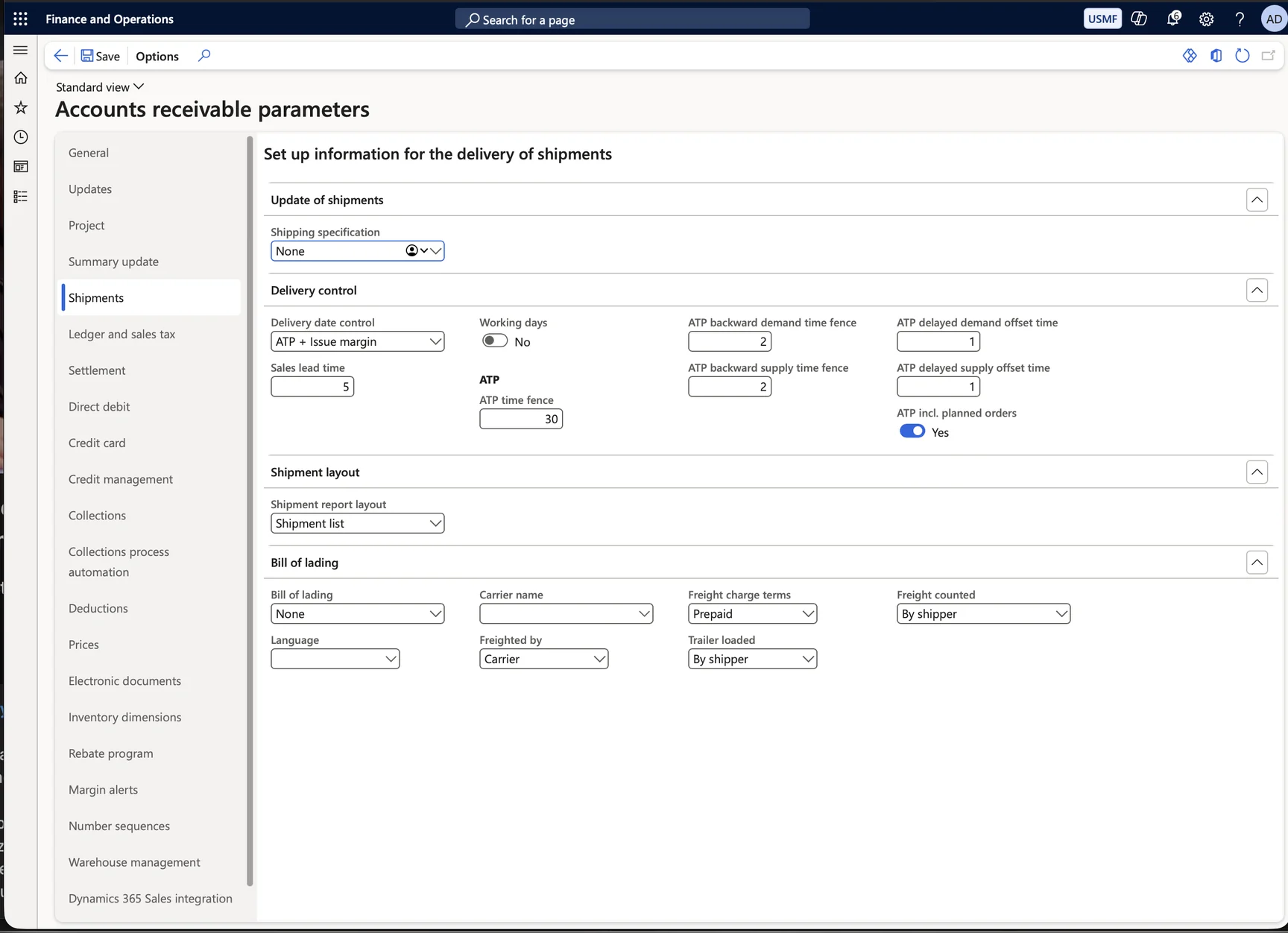
    Field
    Delivery date control
    Value
    ATP + Issue margin
    Because of
    REQ-034, approved by the functional lead
  2. The route is picked
    In this order
    • A data entity, if one covers it
    • The MCP server otherwise
    • The browser as a fallback
  3. Dynamics 365 is updated
    Limits
    • Sandbox only, never production
    • Under its own least-privilege role
    • One legal entity at a time
  4. The value is read back
    Afterwards
    • Compared with what was approved
    • Logged with who and why
    • A mismatch goes back to a person

Agents do the typing. A narrow role limits them, and your approval decides.

Why the MCP server comes first

It is the route Microsoft built for agents, so your partner and your IT security already know it. The browser covers what it cannot do yet.

It is the route Microsoft built for agents.

  • PrimaryMCP serverOpens a form, finds the controls, sets the values and saves, through Microsoft's server interface. Every call is limited by the security roles of the identity that signs in. Accelio signs in as its own agent, with narrow rights.
  • For volumeData entitiesThe standard way to move setup and data in bulk. Used where an entity exists, across legal entities, and for migration loads.
  • FallbackBrowserThe same steps in the user interface, for what the MCP server does not cover yet: some control types, some admin forms and versions before 10.0.47.

Based on Microsoft's documentation for the Dynamics 365 ERP MCP server, read in November 2026. Coverage of parameter forms is still to be tested.

What it connects to, and what it leaves alone

Azure DevOps

Two-way sync. Work items follow Microsoft's catalog template, so epics and features carry the process IDs. There is no second backlog to maintain.

Supply Chain Management and Finance sandbox

Read-only to begin with, under its own least-privilege security role. Later writes go through Microsoft's MCP server first. Sandbox only, never production.

Your data

Planned design: hosting in the EU, strict separation between clients, and your data never enters the shared catalogs.

Your partner

Your partner still builds and delivers. Output lands in Azure DevOps and in the document formats partners already use.

Run a pilot on your own implementation

Two end-to-end processes, your own evidence, your Azure DevOps. Hands-on with us, alongside your partner if you have one.

Two end-to-end processes, on your own evidence.

Apply for a pilot

The Accelio ontology for Dynamics 365

One model of Dynamics 365 Supply Chain Management and Finance: what it is built from, what is in it, and how the objects link.

What it is built from, what is in it, and how the objects link.

What is in it

Four sources at the bottom, the ontology in the middle, and the three parts of Accelio that use it on top. Click a block to see what is in it.

Tap a block to see what is in it.

Used by

AcceleratorsDraft the deliverables
AgentsSet up and loadIn development
Your peopleReview and approve
The Accelio ontologyEvery object carries its origin, its industries and its version

Shared. The same for every client on your version

Per client

Dynamics 365Metadata and code
MicrosoftLearn and the process catalog
Application ImpactExperience from programmes
Your projectEvidence, workshops, backlog

Built from

Objects
    Links
    Comes from

    Example

    How the objects link

    The links are what turn a catalog into an ontology. Dynamics 365 sits in the middle. Shared knowledge points in from above, your implementation from below.

    Dynamics 365 in the middle, shared knowledge above, your implementation below.

    Shared knowledge Dynamics 365 Your implementation Process Application Data is done in shows is stored in is exposed by is served by controls typical gap explains adds is about sets proves loads through calls proves uses Industry practice Documentation ISV solution Process step Form Field and label Table Data entity API endpoint Configuration option Requirement Setting Test case Business skill Migration mapping Interface

    Swipe sideways to see the whole map.

    Every object says where it comes from

    Real projects add to the standard. Without this tag the ontology would describe a Dynamics 365 that nobody runs.

    1. Your extensionsDiscount approval field
    2. ISV solutionsEDI message table
    3. Microsoft standardSalesLine table, Sales order form, Delivery date control

    And which industries it applies to

    Industry practice and typical gaps are tagged, so a distributor is not shown advice meant for a process manufacturer.

    • Discrete manufacturingBills of materials and routes
    • Process manufacturingFormulas, batches, co-products
    • Wholesale and distributionAvailability, warehousing, transport
    • RetailAssortments, stores, channels

    The first four. Lean and mixed-mode are ways of working inside manufacturing, not industries of their own.

    Every answer goes all the way down to the code

    Accelio is built on Dynamics 365 itself. Read it from the top: a requirement comes in, Accelio finds the object it is about, and looks that object up at every level, down to the code that runs it.

    Read it from the top: one requirement, looked up at every level down to the code.

    1Start here: a requirement comes in"Sales orders above a discount threshold must be approved."REQ-058, from the sales director

    2Accelio finds what it is about

    Sales order lineOne node in the ontology

    3and looks it up at every level, down to the code

    The knowledge around it

    Dynamics 365, the application itself

    Engineering, connected directly into the code

    4The answer comes back with its sources

    Fit-Gap verdict for REQ-058A gap, closed with two fields and an approval stepEvery claim links to the layer it came from
    Playing. Click a layer to stop on it.The example follows one requirement from the demo. Object names are from the standard application. The process number and the programme insight are demo content.
    How Accelio uses itThe accelerators, the approval log and the routes into Dynamics 365.See the architecture

    Ontology is the term data platforms such as Palantir Foundry and Microsoft Fabric IQ use for a model of objects, links and rules. They model a company's operations. Accelio models Dynamics 365 itself and your implementation. An earlier draft of this page is still here.

    Run a pilot on your own implementation

    Two end-to-end processes, your own evidence, your Azure DevOps. Hands-on with us, alongside your partner if you have one.

    Two end-to-end processes, on your own evidence.

    Apply for a pilot

    An ontology for Dynamics 365 Supply Chain Management and Finance

    An earlier draft, kept for comparison. Go to the current page

    What is in the ontology

    It starts with Dynamics 365 itself. Your implementation is linked to it. Then come the actions an agent may ask for.

    Add the layers one at a time.

    • Dynamics 365 object
    • Your implementation
    • Action
    • Action in development
    Playing. Click a step to stop on it.
    In development

    One action, defined once

    Set parameter is one action in the ontology. It carries its own inputs, rules, permission and targets, so the agent never improvises them.

    Each action carries its own inputs, rules, permission and targets.

    Set parameter
    1. The agent asks
      Inputs
      Parameter
      Delivery date control
      Value
      ATP + Issue margin
      Because of
      REQ-034
    2. The rules are checked
      Rules
      • The fit-gap verdict is approved
      • The value exists in your version
      • Sandbox only, never production
    3. A person approves
      Permission
      • The agent may ask
      • The functional lead approves
    4. The systems are updated
      Updates
      • Dynamics 365 sandbox
      • Ontology, with who and why
      • Azure DevOps work item

    The agent can ask. The system decides whether it runs.

    Where the objects come fromScreens, fields, tables, data entities and code, read from Dynamics 365 itself.See what it is built on

    Ontology is the term data platforms such as Palantir Foundry and Microsoft Fabric IQ use for a model of objects, links, rules and actions. They model a company's operations. Accelio models Dynamics 365 itself and your implementation.

    Run a pilot on your own implementation

    Two end-to-end processes, your own evidence, your Azure DevOps. Hands-on with us, alongside your partner if you have one.

    Two end-to-end processes, on your own evidence.

    Apply for a pilot

    Migration

    Data migration is where saved rules pay off most. Extract, validate, clean, map, transform, load and reconcile, as many times as you need before go-live.

    Saved rules pay off most in data migration. Run it as many times as you need before go-live.

    In development

    Rehearse the migration twenty times, not three

    A mock migration is weeks of manual work, so most programmes manage three or four before go-live. Accelio saves every rule, mapping and decision. The next run is a replay, and your people only see what is new.

    Most programmes manage three or four manual mock runs. Accelio saves every rule, so the next run is a replay.

    Three to four manual mock runsTwenty replayed runs
    Migration work startsGo-live
    Share of records that load without error, run by run. An illustration of the principle, not measured results.

    One run, in practice

    Follow one customer record from the old system into Dynamics 365. It is rejected in run 14, fixed once with a rule, and loads in run 15 without anyone touching it.

    Accelio

    Your D365 specialist

    Playing. Click a step to stop on it.Demo data. The record and the numbers are invented.

    Your D365 specialists approve each rule once. Every later run replays it.

    Run a pilot on your own implementation

    Two end-to-end processes, your own evidence, your Azure DevOps. Hands-on with us, alongside your partner if you have one.

    Two end-to-end processes, on your own evidence.

    Apply for a pilot

    Fourteen accelerators on one ontology

    Pick one to see what you provide, what it is built on and what it generates.

    Define
    Design
    Build
    Deliver

    The order they are built in

    Along the chain, because each accelerator needs the output of the one before it.

    1. First

      Current State, Requirement Matrix, Fit-Gap, Architecture Diagram

      You can use these before the partner starts. They produce the inputs everything else depends on.

    2. Second

      Functional Design, Test Case, Project Office

      The heaviest document load in a project, and the largest saving.

    3. Later

      Configuration, Migration, Integration, Technical Design and Code, Training, Cutover, Business Skills

      These need environment access, more catalog content and more trust from the partner.

    One ontology feeds every deliverable

    Your evidence and your decisions go in once. Every accelerator reads from the same ontology and writes back to it.

    Goes in
    Your evidenceData model, extracts, process documents, integration specifications
    Your answersThe vision questionnaire, confirmed by process owners
    Microsoft's materialBusiness Process Catalog, application metadata, Learn
    Is kept
    Client ontologyRequirements, decisions, designs, tests and the links between them. One per client. Owned by you.
    Is drafted
    DefineCurrent State, Requirement Matrix, Fit-Gap, Architecture Diagram
    DesignFunctional Design, Integration, Technical Design and Code
    BuildConfiguration, Migration, Test Case
    DeliverTraining, Cutover, Project Office, Business Skills
    Comes out
    Azure DevOpsEpics, features, requirements and test cases, kept in sync
    DocumentsIn the Word and Excel formats your partner already uses
    DiagramsRedrawn when the ontology changes

    Between draft and output, a named person approves each item.

    What no accelerator generates

    These stay with people. The platform only prepares the input for them.

    • The business case
    • The legal entity structure
    • Opening balances and cut-off
    • User acceptance testing and sign-off
    • Classroom training
    • The rollback decision

    Why you can trust the drafts

    • A source on every line

      A claim about standard functionality links to Microsoft Learn or to the application metadata for your version. No source, no claim.

    • A named person approves

      Process owners confirm requirements. Sponsors accept gaps. Functional leads sign designs. The platform records who and when.

    • You own the result

      Requirements, decisions and the reasons behind them sit in an ontology that you own. Your partner still builds and delivers.

    Questions we expect

    Is the product finished?

    No. It is in development. The screens on this site are the product design with demo data, and every figure on them is invented for the demo. Pilots are being planned.

    Does it replace our implementation partner?

    No. Your partner still builds and delivers. The accelerators draft the deliverables, and the output lands in Azure DevOps and in the document formats partners already use.

    What if a generated claim about standard functionality is wrong?

    Every claim links to Microsoft Learn or to the application metadata for your version, so it can be checked in a minute. A claim without a source is not shown. A named person approves each item before it counts.

    Where does our data live?

    The planned design is hosting in the EU, strict separation between clients, and a rule that client data never enters the shared catalogs. The contract will state what is learned from a project and what is not.

    Which products does it cover?

    Dynamics 365 Finance and Dynamics 365 Supply Chain Management. Nothing else.

    Where do the percentages come from?

    From Application Impact scoring 80 deliverables of a typical Supply Chain Management and Finance project. They are estimates, and the share for solution insight is provisional until it is re-scored. A pilot measures the real figure on your project.

    Six questions for your partner

    Not buying anything yet? Take these to your next partner meeting. They work with any partner and any tool. Mark each answer and see where you stand.

    Take these to your next partner meeting. Mark each answer and see where you stand.

    1. How much of the estimate is done by AI?

      What share of the hours in your estimate is done by automation and AI, and where does that show in the price?

      A good answer has a percentage, and the lines in the estimate where it lowers the hours.

    2. How much of each deliverable is generated?

      For each deliverable, what percentage is generated from a connected model, templates or AI, and how much does that lower its cost?

      A good answer has a percentage per deliverable, how it is generated, and the hours it saves.

    3. Who owns the knowledge when the project ends?

      Do you keep our requirements, decisions and designs in one connected model, or in separate documents? Who owns it when the project ends?

      A good answer has one connected model that you can open, and that stays with you.

    4. Do agents set up the prototype, or people?

      Do agents set up the prototype from approved decisions, or does a consultant set every parameter by hand?

      A good answer has a log of what was set, from which decision, and who approved it.

    5. What is the source when AI says standard covers it?

      When AI says that standard covers a requirement, what is the source, and who signs it?

      A good answer has a link to Microsoft Learn or the application metadata, and a named person.

    6. Does it run on Microsoft's own route?

      Does your AI tooling reach Dynamics 365 through Microsoft's MCP server and business skills, or through a route of its own?

      A good answer has Microsoft's MCP server as the main route, and a clear reason for every exception.

    Our own answers

    We hold ourselves to the same six questions. The product is in development, so some answers are not a yes yet.

    1. Question 1: Our estimate is that 37% of the implementation effort can be drafted by Accelio, and that development, another 16%, runs faster with AI coding assistants. The pilot target is 20% less effort. None of these is a measured result. A pilot measures the real figure on your project.

      Estimate
    2. Question 2: Our estimates run from 45 to 95% per accelerator, for example 70 to 85% of the requirement matrix and 45 to 70% of the fit-gap. Nothing is in production yet. Eight accelerators are designed, and Current State, Requirement Matrix and Fit-Gap are built first.

      In development
    3. Question 3: One ontology per client holds requirements, decisions, designs, tests and the links between them. You own it, and it stays with you when the project ends.

      Designed, not built yet
    4. Question 4: Not yet. The configuration catalog has a first pass of 1,933 parameters on 19 forms. The agent that applies approved values to the prototype comes after the first accelerators.

      In development
    5. Question 5: Every claim links to Microsoft Learn or to the application metadata for your version. A claim without a source is not shown, and a named person approves each item before it counts.

      Designed, not built yet
    6. Question 6: Microsoft's MCP server is the primary route, with data entities for volume and the browser only as a fallback. Business skills are a deliverable at go-live. The agents that do this are in development.

      In development

    Run a pilot on your own implementation

    Two end-to-end processes, your own evidence, your Azure DevOps. Hands-on with us, alongside your partner if you have one.

    Two end-to-end processes, on your own evidence.

    Apply for a pilot

    Run it on your own implementation

    The pilot runs the Requirement Matrix and Fit-Gap accelerators on two of your end-to-end processes. Hands-on with us, alongside your partner if you have one.

    What is in the pilot

    • Two end-to-end processesOrder to cash and Inventory to deliver, plus the finance foundation.
    • Your own evidenceData model, extracts and process documents from your current system.
    • Two connectionsAzure DevOps, two-way. A Supply Chain Management and Finance sandbox, read-only.
    • Four deliverables you keepFit-gap, scope pack, Azure DevOps backlog and traceability.

    Pilot scope is planned and may change.

    What the pilot has to prove

    Four tests, agreed before we start. If it fails them, you will know.

    1. Rebuild the fit-gap of a finished project from its original inputs, and compare it with what was decided and built.
    2. Process owners confirm pre-answered questions faster than they answer blank ones, and trust the evidence shown.
    3. A partner architect finds no factual error in the fit claims for the two processes.
    4. The scope pack changes at least one number in a real partner estimate.

    The target is 20% less implementation effort

    A target, not a promise. Your pilot measures it.

    Apply for a pilot

    For organisations planning a Supply Chain Management and Finance implementation, or early in one.

    The button opens your email app with the application written for you. Nothing is sent until you press send.

    Your email app should now be open. Check the text and press send. We reply ourselves, not a sales team.


    No email app on this device? Copy the text and send it to .